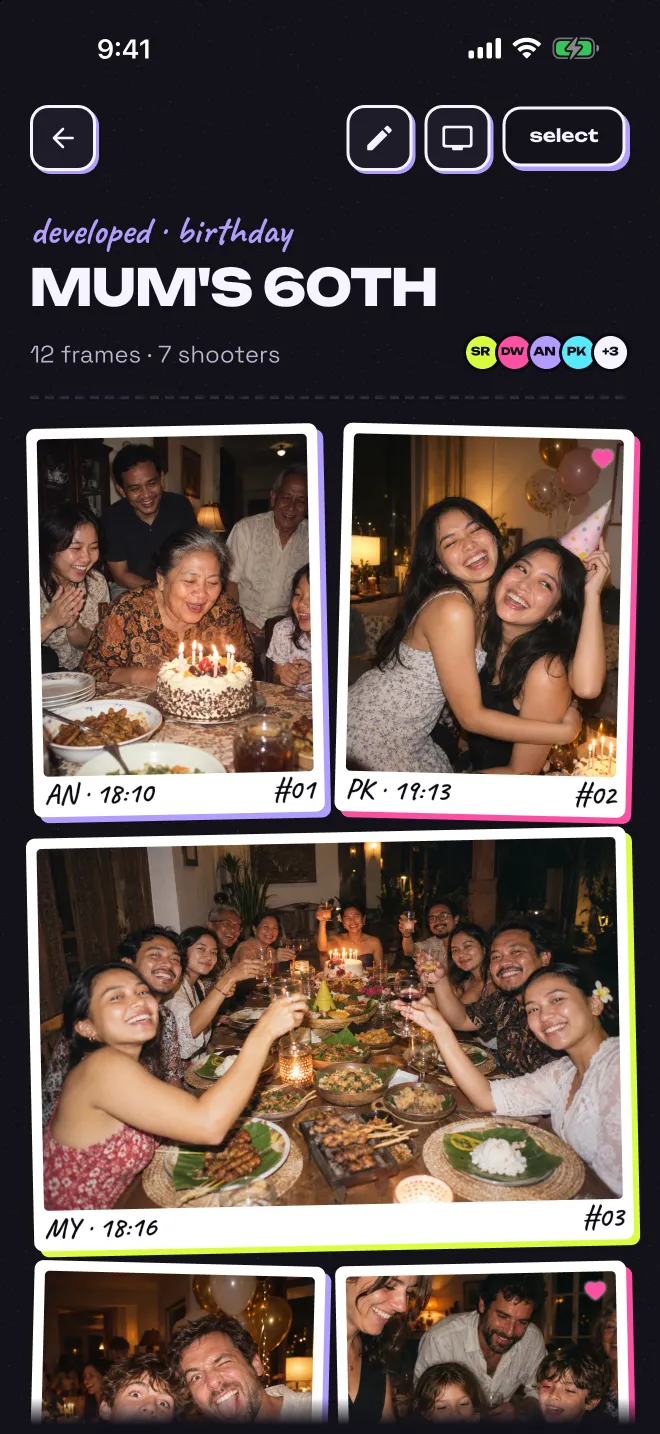
A group camera app for your event. Everyone takes photos on their own phone, but nobody can see them yet. When the roll closes, the whole album opens for everyone at the same time.
Got an invite link? Open it on your phone. Guests join right in the browser, no install.
how it works
01 · load
Load a roll in the app.
A roll is one shared camera for one event. Open Polaric, tap load a new roll and give it a name. Choose how many photos each guest can take (12, 24 or 36) and how long the roll stays open. It is free for you plus up to 5 guests.
02 · invite
Share the QR code.
Put the QR code on the table, or send the link to your group chat. Guests open it on their phone and start taking photos in the browser. They do not need the app or an account.
03 · shoot
Everyone shoots. Nobody peeks.
Each guest can take a set number of photos. There is no preview and no retake. Nobody can see the photos yet, not even the person who took them. You can see how many photos are left and who is taking them. Want everyone to see photos right away instead? Turn on live album when you load the roll.
04 · develop
The roll closes and develops.
The roll closes by itself at the time you chose. You can also close it yourself, if you turned on Let me close it early. Then the photos develop: a short countdown, the same on every phone.
05 · relive
Everyone gets the whole album.
Everyone sees every photo at the same moment, in one shared album. Save the ones you love to your phone.
Tap a style to see it on the TV. The host picks one in the app and can change it any time.
Open polaric.app/tv on a smart TV, laptop or projector, and a code appears. In the app, tap Show on a screen and type that code, or scan it. The TV also shows a QR code, so late guests can join.
If live album is on, new photos appear on the TV about a minute after they are taken. If it is off, the TV keeps the photos hidden and shows them all when the roll develops.
The app is free. A roll is free for you plus up to 5 guests. For a bigger group, buy more guest spots for that roll in the app. You pay once, it is not a subscription, and guests never pay. Only guests who take photos use a spot, so people who just want to see the album are free.
guest spots per roll
up to 5 guests
Free
10 guests
$2.99
25 guests
$4.99
50 guests
$9.99
100 guests
$14.99
150 guests
$19.99
200 guests
$29.99
unlimited guests
$59.99
Prices in US dollars, the same on the App Store and Google Play. Your app store shows the price in your local currency.
questions
Good to know.
What is Polaric?
Polaric is a shared, single-use film roll for gatherings. It works like a digital disposable camera that the whole group shares, each person on their own phone. A host creates a roll, guests join from an invite link or QR code, and everyone shoots a set number of frames. By default, nobody sees a photo until the roll closes. Then the whole album develops for everyone at once. Polaric is made by Codefoundry.
How does a roll work?
The host names the roll, picks 12, 24 or 36 frames for each guest and chooses how long it stays open: 3 hours, 6 hours, 12 hours, 1 day, or until a date and time they pick, up to 30 days ahead. Guests scan the QR code or open the link and start shooting. There is no preview and no retake. When the roll closes, it develops and the album opens for every member at the same moment.
Do guests need to install the app?
No. Guests can join from the invite link or QR code in their phone's web browser, with no install and no account. They can also join in the Polaric app. The host creates the roll in the Polaric app, which is on the App Store and Google Play.
Can Android users join a roll?
Yes. Guests on Android join in their phone's web browser, the same way as guests on iPhone. Android users can also host a roll in the Polaric app from Google Play.
Can I show the photos on a TV?
Yes. Open polaric.app/tv in the browser on a TV, laptop or projector, then the host taps Show on a screen in the app and enters the code the TV shows. With a live album, photos come up on the TV about a minute after they are taken. Without one, the TV plays the reveal when the roll develops. The host picks how photos come in: floating prints, instant develop, spotlight, film strip or a table pile.
How many people can join a roll?
Anyone with the invite link can join and see the album. Only guests who take photos use a spot: a free roll covers up to 5 of them plus the host. For a bigger roll, the host buys guest spots for that roll in the app: 10, 25, 50, 100, 150, 200 or unlimited guests.
How much does it cost?
The Polaric app is free, and a roll is free for up to 5 guests plus the host. For a bigger roll, the host buys guest spots for that one roll in the app: $2.99 for 10 guests, $4.99 for 25 guests, $9.99 for 50 guests, $14.99 for 100 guests, $19.99 for 150 guests, $29.99 for 200 guests, and $59.99 for unlimited guests. It is a one-time purchase, not a subscription, and guests never pay. Only guests who take photos use a spot, so guests who only want to see the album are free. The App Store and Google Play show the price in your local currency.
When do the photos appear?
By default, when the roll closes. It closes at the time the host chose, or sooner if the host turned on "Let me close it early" when setting it up and closes it by hand. Until then nobody sees a single photo, not even their own, though everyone can see how many frames are left, how many have been shot and who is shooting. The host can choose a live album instead, where everyone sees photos as they are shot.
Who can see the photos?
Only members of the roll see them. Members are the host and the guests who joined. Anyone with the invite code can join, so share it only with your people. Members can save photos to their camera roll, mark favourites that only they see, and report a photo. Polaric shows no ads and never sells your data, and photos are deleted when the roll or the account is deleted.
polaric · 35mm · 24 exp
Load a roll for your next night out.
Polaric is on the App Store and Google Play. Download it for iPhone or Android and load your first roll free. Questions? Write to info@codefoundry.co.id.